WHAT'S NEW?
Loading...
Showing posts with label Blogging. Show all posts
Getting traffic to your website is difficult enough considering the algorithm changes that Google does annually. However, keeping incoming traffic from leaving your site is even tougher. It’s essential for website masters to keep visitors on their site as long as possible as it helps to reduce Bounce Rate.


Tips To Reduce Bounce Rate


Bounce Rate is an important SEO factor. It’s an analytic measurement that helps Google determine if the content of your site is relevant to what the user is searching for, or if it has quality content to keep the visitors interested.

Google measures your bounce rate in percentages. The lower your percentage, the better it is for you. It means fewer people are leaving your site when they land on it. Having a high bounce rate is radically junk traffic visitors are going to the site but are exiting as soon as possible when they see the homepage.


Google measures Bounce Rate by two factors:

1. The amount of clicks within your site: meaning that visitors are viewing more pages than just the homepage.

2. The amount of time a visitor stays on your site: if they are staying less than 5 seconds, it’s considered a Bounce Rate.

Why do Bloggers want to keep their Bounce Rate as low as possible?


Keeping a low Bounce Rate helps to build rapport with your visitors, so they like and trust you. It’s directly linked to Click Through Rate (CTR). And it’s this CTR that is responsible for your site to convert traffic into money. Thus, building trust and credibility are a crucial component of a website because it affects earning levels. If visitors like you, and they like what you have to say and offer, they’re more likely to take action to whatever it is that you are suggesting them to take such as: signing up for your newsletter, downloading your e-book, buying a recommended product (affiliate commissions) or making a product/service inquiry.

So, not only is it important to get traffic to your blog but for conversion purposes, you’ll have to learn the techniques and tips to keep your traffic from leaving your site.
Tips to keep your Bounce Rate Low:


1. Professional Design & Layout

Professional Design
The look of your website can make or break you. The first impression is the best impression. You don’t want a site that looks dull. Credibility is crucial in internet marketing, so don’t ruin it by having a cheap or unprofessional looking site. If visitors can’t stand to look at the site, chances are, they are not engaged in the content. The first rule in internet marketing or doing any online business is establishing trust, credibility and authority. Having a well organized, clean, modern and professional theme helps to build that confidence, and it is a must for website owners to incorporate. This is not a Do-It-Yourself task, buy a professional theme or hire a professional to help you with this, preferably a professional web designer that has internet marketing visual experience.

2. Readability

There is no point in having great content if it’s not readable. Make sure the background is not distracting, no audio in the background or distracting/confusing advertisements that take away from your content such as pop-up windows or messages. I hate some Flash websites where they have animated or moving background; it’s very distracting when you’re trying to read a page (especially the ones with audio in the background!)

Use font colors and type that are easy on the eyes, like Arial, Verdana or Helvetica. Don’t make your links the same colors as your content text. How are visitors supposed to know what to click?

3. Easily Accessible Information

Having an organized, structured and a clean website is essential for your audience so they can find information instantly. A good navigation bar (without broken links) that’s accessible and well-grouped together makes things user-friendly and accommodates all types of audiences, young & old. Remember, your audience is searching for information to solve their problems or issues, make it very easy for them to get what they want.

Use things like Tags, Categories, Recent Posts and a Featured section to bring attention to several articles and posts. Don’t make pages/posts too long: people don’t want to scroll endlessly. Have paginations at the bottom so people can navigate to which section they want to go in the post/article.

4. High-Quality Content

People go on the net to search for information, ideas, inspiration or entertainment. Whatever it is they are searching for, make sure you stand out from the rest of your competitors by having High-Quality content. High-quality content is content that’s unique, well-thought, well-researched, well-written and shows that they're substance and effort put into the post/article. Spun articles or things that are duplicated do not have the same effect on visitors. Be as original and creative as possible and deliver good content for your visitors. Your visitors will love it, and so will Google.

5. Engage Your Audience – Use YouTube Videos

Few people know this, but Google spiders can crawl through Podcasts. So for some articles/posts that are very long and boring to read, consider doing a podcast so people can listen to it instead. Google can index it as well.

Google can’t crawl through videos, but they do know what the video is about based on the description of the video and the keyword tags used to describe the videos.

Make sure to post videos and podcasts that are relevant to the content of your post/page. Videos surely keep visitors more involved into your content, and they will get them stick around a lot longer. Whatever videos you decide to use, make sure that the related videos links are disabled, so visitors are not tempted to click on the next video and navigate Away from your site.

6. Have a Great Title!

No one is going to click to read your article/post if the title already sounds boring. Make sure your titles stimulate curiosity. It should also have relevant keywords and provide solutions to whatever your visitor is looking for.

Powerful titles like the title of this post do one thing: Make people want to click on it. Thinking up of great titles can be tricky and tough. However, there’s no need to re-invent the wheel. Just check out similar posts from your competitor’s site and recycle what they use but with your keywords and your twist to it.

Loading Spinner
7. Fast Loading Websites 

Visitors hate slowing loading pages, and so does Google. This matters in SEO and page ranking. People who are not technical or web savvy don’t have a clue about this, but how well your site is coded matters in SEO. Pictures/images should be optimized, Codes should be coded to W3C standard, CSS minimized, files gzipped. You can analyze your Site loading speed using Google PageSpeed Insights. There you also get personalized suggestions to reduce your page loading speed.

What's Next? Go ahead and Optimize your site to decrease the Bounce Rate. You can leave off your queries by commenting below.
Hey, guys, I'm back after a long time.I’ve been around the blogosphere for almost four years, and I’ve read just about every type of blogging shit there is. I’ve seen masters of prose, masters of spin, masters of drama, and masters of nothing at all. So, here are 11 common lies you come across in the blogging world. Let’s expose them!


11 Common Blogging Lies

1. Content is King

Content is King

I once believed that content really was king. Many years back, when all those power bloggers such as Problogger, Copyblogger, John Chow, Harsh Agarwal and many others were starting to become famous, content really was king of the kings.

Today, regardless of how good your content is, if you know no one in your niche, nobody will give a preference about what you write. So who is the king now? 
One word: Connections.

2.  Keep Trying

Just keep trying and you will succeed!” Bloggers love saying this, and while it might not be a totally a lie, it’s not the whole truth, either. It’s entirely possible that you’ll work your ass off and never make a dime. Sometimes, quitting is the best option.

3. Great Post!

Be honest, you never read it! How many times have you or someone you know commented on a post you didn’t finish or even try to understand? It happens more often than you think.

4. SEO is King

SEO is King

Whoever said SEO is king should slap himself on the face. Regardless of how good you are at optimizing your content, you’ll never get to the top spot on Google unless you’re connected with the biggest blogs in your niche.

Truthfully, even if you have connections to those big blogs through links in your content, you still won’t get the first spot on Google.

5. More Traffic = More Money

Have you heard of a blog called “The Secret Diary of Steve Jobs?” As its name suggests, it’s a fake blog supposedly written by Steve Jobs. The blogger’s actual identity was revealed in the New York Times, which sent a half-million people to his blog in one day. Nice, right?

And how much did he earn from that single day? You won’t believe it: about $100 in Adsense. Can you imagine getting half-million visitors and making only a hundred dollars? Now tell me: do you still think that more traffic = more money?

6. I Don’t Blog for Money

Unless you’re blogging about personal stuff, please don’t tell me you don’t blog for money. Everyone, including me, intends to make money via our blog at some point.

7. Must Post Daily

This is one of the biggest lies out there. It causes every blogger to throw their hard work to the devil. Posting daily is totally up to you. It purely depends on the niche. Don’t believe in this statement unless you have the resources and the ability to post daily.

8. I Care About You

Many bloggers say this – even professionals and gurus. The truth is, they really care if You see the word “if”? Well, that means they care “if” you follow their instructions, which usually means buying their stuff.

Of course, they’re not superheroes. They’re just like us. It’s up to you to decide who you want to listen to.

9.  Anyone Can Do It

Ask yourself how much information you’ve learned compared to how much action you’ve actually taken. There’s a limit to what we can do – not because of our resources, but because our mind is lazy.

If anyone can do it, there would be thousands or even millions of Steve Jobs and plenty of Apples competing for our pocketbooks.

10. Posts Should Be Long

The people who post advice on how many words you should post are typically individuals who don’t have anything to post. It totally depends on the post.

Just remember this sentence: There is no long or short content, only boring content.

11. You Don’t Need Experience

Try driving a car without any experience, and see how well you drive. Now, try blogging without experience and see if you can make money blogging. The truth is that everything you do in blogging just builds experience. Without it, you’ll never learn.

So, heard any more shitty lies you’d like to share? :P
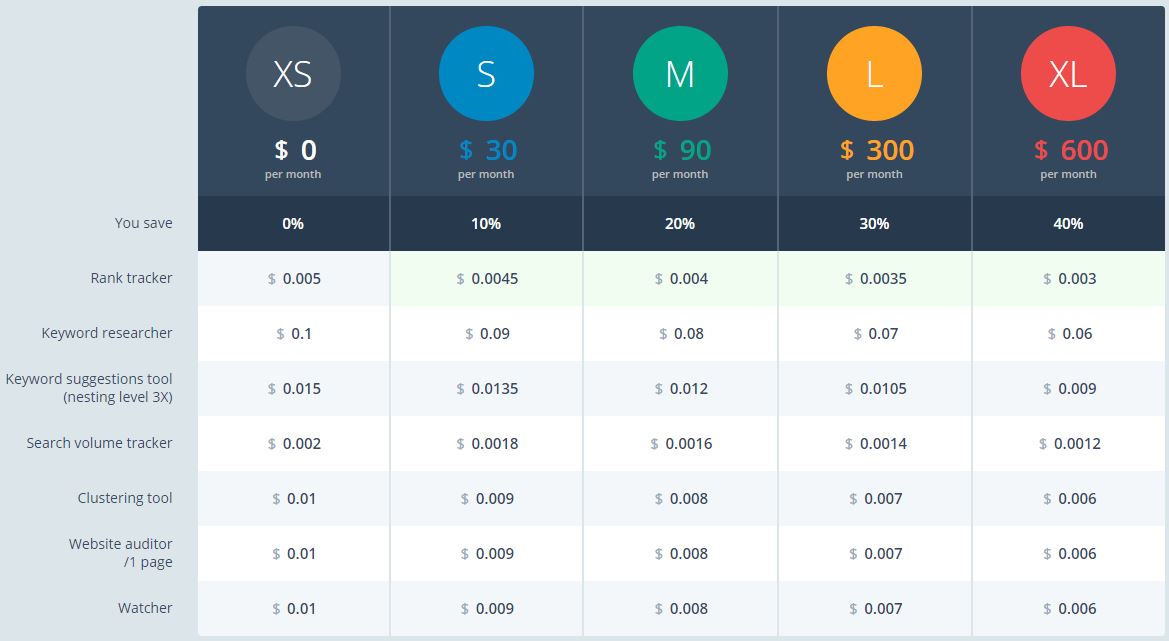
Hey, guys, I'm back with an Ultimate Giveaway. I'm giving $100 Topvisor credits to one person. And, nine people will get $25 Topvisor Credits. Topvisor is a great All in One SEO tool. It consists of plenty of tools like Rank Tracker, Keyword Researcher, Keyword suggestions tool, Search volume tracker, Clustering tool, Website Auditor, Watcher, Sitemap generator & much more. I'll personally say It's the Perfect SEO tool there in online.


Topvisor GiveAway

What is Topvisor?

Topvisor is a website analytics software and digital marketing tools that can hands down measure effectiveness of an SEO-campaign.

Rank Tracker: Accurate and reliable tracking of site rankings

Easily track rankings of your website, competitor sites, and websites of your clients overseas across multiple search engines: Google, Yahoo, Bing, Yandex and Sputnik. Add any domains or pages to be tracked at high speed and with top-notch quality: websites, social media pages or Youtube videos.

Keyword research: Research and gather keywords

Grab keywords and get competitive keyword insights from all available sources: Google Adwords, Webmaster Bing, and Yandex.Direct. Make your website keyword-rich: run a keyword grouping tool and get a comprehensive keyword structure for every page of your site.

Website Auditor: Technical audit and site examination

Examine your projects to detect possible issues with indexing, inbound and outbound links, titles, meta-tags, and pictures.
Make sure that pages of your site are not only user-friendly but handy for crawlers as well.

Plans & Pricing

Topvisor Plans and Pricing


What's Next? Join the Giveaway below and Win $100 credited to your Topvisor Account. Do as more entries you can. The more you do, the more you have chances to get rewarded.
Win $100 Topvisor Credits

You can find the name of web hosting company and domain hosting provider of any website by reading this post. Many of them are seeing many sites, and they also wanted to create a site like that, but they don't know that site's web hosting company. So, by reading this post, you can know the name of web hosting company and domain hosting provider of any internet site.


find the name of any website web hosting company
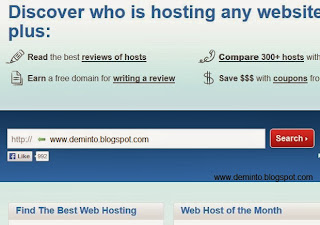
  • There is a website called Whoishostingthis, first, go to that website by clicking here.
  • Click on “enter the domain here”. And, Type the website address to which you want to find the web hosting company name and click on the Search button.
find the name of any website web hosting company

  • Now, you will see the Hosting company, IP address, and Name servers.
find the name of any website web hosting company

  • That's it.

Please share this post with all your loved ones to share the knowledge the way we did. It is the only favor we request in return. If you have any doubts in your mind then, please comment and clear your doubts.
In this post, I am going to show you "Ping your blog for better SEO". A ping is a tool, which a blog notifies a server that its content has been updated. An XML-RPC signal is sent to one or more "ping servers," which can then generate a list of blogs that have new material. Today, most blog authoring tools automatically ping one or more servers each time the blogger creates a new post or updates an old one. I have recently found a website named Pingomatic. It is best then any other pinging services.

Pingomatic


Ping-O-Matic is a service to update different search engines that your blog has updated. It is a web-based internet marketing tool that enables business users to get their websites, blogs or any link on the web pinged automatically. By doing so, webpages get high ranks on search engines, such as Google or Bing
Every time you write a new post in your blog then ping it immediately, To ping your blog follow this steps:
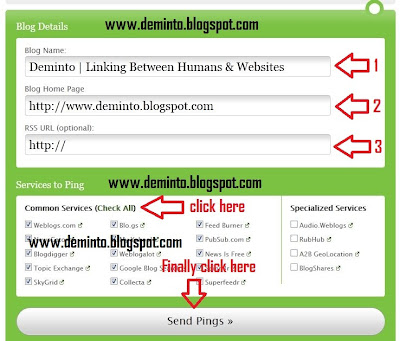
  • Type Blog name and Blog home page URL. You can also type RSS URL of your blog. But, it is optional.
Pingomatic Ping Tool


  • Click check all as you seen in the picture.
  • Finally, Click the button Send pings.
  • That's it; You are done. Now your new post gets more visitors faster than ever.

If you face any problem, please comment below, I will respond to it.

Get a FREE Domain Name - www.YOU.tk !!!  Without signup
Plus No ads at all, free URL redirection (free URL forwarding)

.TK Free Domain Name: Project was developed to provide free domain names or free subdomains with .tk domain extension to those who wish to get a cool and totally free website address.
  • Do you have a long web site address that is difficult to remember?
  • Do you want your website to look professionally without obtaining a paid domain name?
  • Do you often change your free hosting providers, so that you have to change your website address as well?

Use this free domain name to access your website, no matter where it is hosted.
Of course, this service is absolutely free and we don't place any ads on your website!
Just setup a Free URL redirection with URL cloaking (url masking) and forward it to your real website url.  

To create a free domain go to www.rockdomain.tk  
This will definitely works and tried by my own. our deminto's domain was also created by this website. our new domain is www.deminto.tk
While authors blog for various reasons, one of the most common factors of blogging is the desire to get the word out.


One way to increase your blogging audience is to publish the articles you write on your blog to your Facebook fan page(s) or personal page. Let me share with you one of the ways you can publish your blog articles to Facebook automatically when you post.

Just follow the steps:-

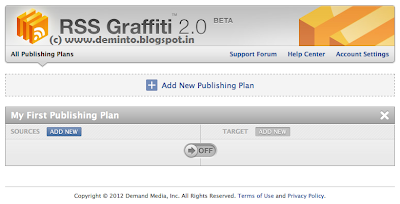
  • First of all go to the RSS Graffiti Beta 2.0 page. Click here.
  • Click on Add New Publishing Plan. Then enter your blog's name and then click on Create Publishing Plan.
 
  • Now click on ADD NEW in the SOURCES section. 
  • Enter your Blog's or Website's URL and then click on Add Source.  
 

  •  Now in the Feed Setup section,no need to write or change anything. But in SCHEDULING section, set Update Frequency as As soon as possible, Maximum Posts Per Update as System Maximum and Post Order Per Update as Publish older posts first and then click on Save.
  • Again click on ADD NEW, but this time in the TARGET section.
  • Now in the TARGET SETUP, Select your fan page in the Choose Target option and again select your fan page in the Publish on Behalf of option also and then choose your POST STYLE (you can choose any one from the three options) and then click on Save Changes.

  •  Finally, enable your publishing Plan.


That's it! Now whenever you will update a post on your blog, it will be automatically posted in your Facebook fan page within few minutes.
In this tutorial, I am going to share how to open all web links or hyperlinks in new tabs. You might have all kinds of reasons as to why you want to have your links to open in new tabs. If I had to guess, I would say you want your readers to keep exploring and crawling your blog/website while always having a chance of going back to the referring page (where they came from).


When you click on a link of a blogger blog, it opens in the same tab which is a bit annoying. To change this thing, you will have to add a small code in your HTML section which is only going to take a few seconds. Let me show you how to do it.


  • Go to Blogger- Template- Edit HTML.
  • Click on Proceed.
  • Now search for <head> (Use "Ctrl+f" to search).
  • Just below  <head>  add the below code.
<base target='_blank'/>
  • Click on Save Template and you are done.
  • Now visit your blog and click on any link. You will see that the link will open in a new tab.
I know flashing text is banned at many places but still as my visitors requires it. Its very easy to make a sentence blink using HTML. You just have to add two tags before and after of the text you want to blink.


In order to make text blink, simply enclose the text within the <blink>......</blink> tags. However, keep in mind that many people find blinking text to be annoying and you have no guarantee that the text will blink in every browser.

For example you want to blink "Welcome" ,then you want to type <blink>welcome</blink>.
And on browser, this is how it will appear welcome.

Now say, how easy it is!
Somebody needs to copy content from any website but, some of the website owners has disabled the right click and selection feature. how to copy protected content in website or I can say tip to copy any websites content. we can copy content by disable the java script in your browser. Now i am going to show how to disable the java script in firefox and chrome browsers.

To disable JavaScript in Firefox:


  1. At the top of the Firefox window, click on the Firefox button and then select Options
  2. In the Options window, select the Content panel
  3. Disable JavaScript: Select this option to permit JavaScripts to execute on your computer
  4. To change advanced settings, click Advanced.
  5. Click OK to close the Options window.
 To disable Javascript in chrome:
  1. In top-right corner,click on setting icon and click on option to open option window.
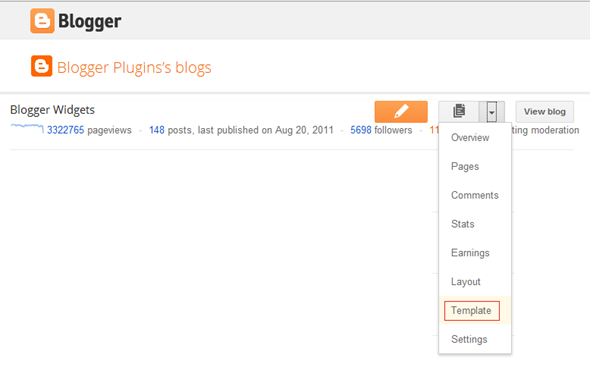
  2. Now, In option window, click on “under the bonnet” option of left panel.
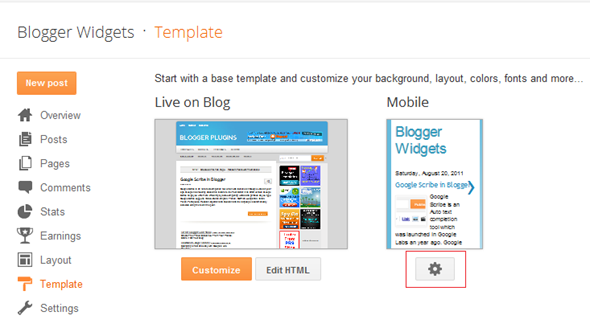
  3. Now in Privacy section,click on Content settings.
  4. After that in javascript radio button,check the “Do not allow any site to run JavaScript

HitLeap Best Auto-surf hits exchange HitLeap.


What is Hitleap?

HitLeap is a free traffic exchange website. It allows you to bring new visitors to your website and the best part is that it is free. HitLeap was once known as TrafficSpammer .In Mid 2012 the old site launched with a new domain and script. HitLeap is a auto traffic exchange where users earn traffic minutes for viewing other people's sites automatically.
To go to hitleap's website, click on the image below, it opens in a new tab.

HitLeap Traffic Exchange
  
How does it work?


After signing up, you will submit all the websites you want to send traffic to.
Then you will earn free traffic by viewing other people's websites.
Alternatively, you could buy a traffic package from us.


HitLeap has a software or you can surf from Mozilla Firefox and earn minutes and meanwhile you'll be getting the hits. If you surf by hitleap Viewer (hitleap software) you can earn 20% extra.


Is it safe for adsense websites?

yes, it is safe for adsense websites.If you have an AdSense website and want to increase traffic, be safe and earn some money, HitLeap is the best choice.

When you submit your webpage to Hitleap, you have an option to hide the traffic source. Since you are hiding the source of traffic, AdSense and Google will not notice that the traffic is coming from a traffic exchange site.

how many websites you can send traffic through hitleap?

HitLeap is a free traffic exchange site and as a free member you can add up to 4 websites.If you have more than for sites to add, you can get a cheap monthly subscription. Find out the monthly rates here.

HitLeap Traffic Exchange


An interesting way of diverting the attention of your readers is to start a discussion over a topic that is trending in the blogosphere. Those who have successful blogs would agree here that reader’s interaction is extremely significant not only for the website’s reputation, but also for generating affiliate sales.  We do have Commenting system that allows readers to interact, but they don’t have the freedom to start a whole new conversation. For that reason, we have Web Forums that allow a user to start a discussion over any topic that he likes. Those who are looking to add a Forum to their Blogger enabled website then today in this article, we will learn how to create a Google Groups Forum in Blogger.

Our Main Goal:

Installing a Forum in a BlogSpot blog appears to be an uphill task. Since, everything is under Google’s control. Therefore, it gets extremely difficult to host a third-party forum. However, when we have problems we also have their solutions. The ideal way of installing a Web forum on our site is “Google Groups”. It neither needs any hosting nor any kind of money because it is free to use. Therefore, the main goal is to embed a Google Groups Web Forum in the website. 

Advantages of Google Groups:

  • Free Hosting: We hardly see any Forum that gives free hosting. The greatest advantage of using Google group is that it needs no hosting. We have to create a Group and embed it onto our website. 
  • Free to Use:  There is no need to pay anything because Google Group is absolutely free of cost. 
  • Highly Flexible: The platform has robust options that allow the webmaster to customize it according to his needs.

Step #1: Creating a Google Group:

Now before, anyone creates a Google group its essential to have a free Gmail Account. However, those who don’t have Gmail Account then, first register it. After registering a Free Gmail account, Sign in to your account. 
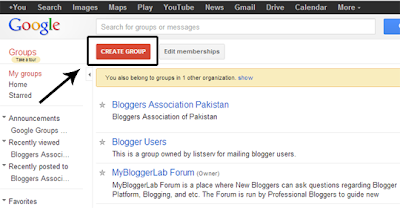
Then Go to https://groups.google.com/forum/?fromgroups#!myforums and from the navigation menu select “Create Group”. The button would be different from others so everyone can easily find it. We have attached a screenshot below for further help.
Now a form will be opened which would ask for details. Don’t be confused because we will explain each and every text area so everyone can fill it without facing any problem whatsoever. Consider the following.

  • Group Name: Here we would enter the name. It entirely depends on a person what he wants to name it. Remember: We can rename it anytime from the setting panel. 
  • Group email address: Here we will choose an email address as well as our Forum URL. For example, if we write “tricksforum” in the text area it would provide us with a free email i.e. tricksforum@googlegroups.com as well as URL i.e. https://groups.google.com/forum/embed/?place=forum/tricksforum
  • Group description: Write something about you forum, just like we add the description in our website. It would help search engines. Furthermore, visitors would be able to understand the main purpose of it. 
  • Group's primary language: This is the language that a person may select according to his desire needs. However, we usually select English (USA) which is a standard language throughout the globe. 
  • Group type: Now this is the most significant thing. There are three options i.e. Email List, Web Forum, Q&A Forum. Since, we are creating an online forum. Therefore, we would select “Web Forum”. However, anyone can select the other options too depending upon their interests. 
Now once everything is done. Select the “Create” button present at the top of the page. Now you will able to see a notification, “Congratulation, your group is up and ready to use”.

Step# 2: Embedding a Google Group in Blogger:

Honestly, this is the easiest part of the whole tutorial. Just login to your Blogger account and go to Blogger >> Add a new Page >> from blogger post editor select Edit HTML Tab and paste the following coding in the HTML Box. Remember: Don’t forget to replace “tricksforum” with the email address keyword that we added in the previous step i.e. tricksforum@googlegroups.com.


<iframe frameborder="0" height="1000px" id="forum_embed" scrolling="no"
src="javascript:void(0)" width="100%">
    <br />
</iframe>
<script type="text/javascript">
    document.getElementById("forum_embed").src =
        "https://groups.google.com/forum/embed/?place=forum/tricksforum" +
        "&showsearch=true&showpopout=false&parenturl=" + encodeURIComponent(window.location.href);
</script>
Congratulations: Now publish the page by pressing the “Publish” button. Cheers the online Google group web forum is added onto your blogger website. Remember: Keep in mind, all the Admin setting can be done through the https://groups.google.com/forum/?fromgroups#!myforums Admin Area.
So you wanna move your sidebar to the left, ha? Well, it sounds tough but not at all actually. Check out below how easy it is.
  • First of all go to Blogger-Template-Edit HTML.
  • Now press "Ctrl+f" and search for #main-wrapper and then look for the word 'float:left;' .
  • After you have found the word 'float:left;', replace it with 'float:right;'
  • Again press "Ctrl+f" and search for #sidebar-wrapper and then look for the word 'float:right;'
  • After you have found 'float:right;' in #sidebar-wrapper, replace it with 'float:left;'
  • Now click on Save template and you are done!
 

Some of the widgets like; Attribution, Navbar, etc on blogger can't be removed because they are locked.
  • First of all, go to Blogger- Template- Edit HTML and then mark the Expand Widget Template box.
  • Now, for example, you want to remove the Navbar widget, then press "Ctrl+f" and search for Navbar.
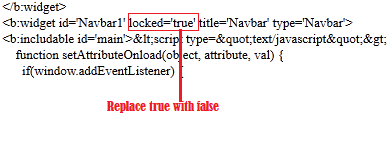
  • After you have found something similar to the below image, then just replace locked='true' to locked='false'
  • Now go to Blogger- Layout, then click on the Edit option in the Navbar widget and you will see a remove option.
That's how you remove locked widget!
Getting huge traffic is a dream for every blog. Not all can achieve this easily. Although it is said that content of the blog decides the traffic range, one has to put in more efforts with regard to other SEO aspects also. Getting instant traffic is not any science rocket if you follow the below mentioned tips:


1. Make use of WordPress: It is one of the most popular and most successful blogging platforms. By default, WP is provided with many SEO advantages. If you take proper care you can get good range of SEO advantage by using this blogging platform.

2. Use SEO Plugins: You can supercharge your WordPress blog and get some good benefits in search engine rankings only when you are using SEO plugins. These plugins will be free to use, in most cases. They can help you in lot ways. In one word, your WordPress can’t give good results without these plugins.

3. Fast Loading Theme :You need to use a professional looking theme. Even though you are using a free theme, you can check that the design is very professional looking. Lot of themes for WordPress are available on the net. Both premium and free themes are present in large numbers. You have to select the theme which can load at faster speeds.

4. Customize Error Pages: When there is any error in retrieving the data from the server by WordPress, it will show an error page. In order to make your visitors to have good impression on your site, even when they are visiting such error pages, you have to customize the 404 error pages. 

5. Add Share Buttons to Blog:At the end of each blog post, users should be able to see ‘Share’ buttons. Nowadays, there is lot of importance for social media marketing. You can’t expect your blog to get good traffic without social media support. When users share your blog posts on Facebook or Twitter, you can easily get huge traffic instantly.

6. Google Analytics for Tracking: Only when you know where from your visitors are coming and what they are looking for, you can be able to give best suitable content for your readers. Hence it is always necessary to install Google Analytics and to track your blog traffic. It is also possible to know the demographics of the visitors through this tracking system. It will allow you to serve targeted audience in a better way.


7. Don’t Neglect Content: Even when you are following all the SEO points, you might not get desired results if the content is not of good quality. For this, you have to create extraordinary content and blog posts. This is the main thing which can attract visitors for your blog. Quality of the content matters the most. It is the most important thing that makes a good impression on the visitor.

8. Keyword Research: Only pro bloggers might be aware of the exact procedures how to perform keyword research. Many newbie bloggers are not aware of the ways to perform this task and hence they are still struggling to get instant traffic. In order to be successful in getting instant traffic, you should know what are the topics trending in your niche. Also, you should be able to find out the keywords people are using to search online. These keywords can help in getting instant traffic since they can give some SEO advantages as well.

9. Guest Posting: Posting good content on fellow blogs is a good idea to get visitors. This will not only provide opportunity to get new visitors, but will also be useful to get quality backlinks. By this method, you can also be able to gain new contacts in your niche. Also, you can be able to get brand exposure for your name or your company name.

10. Blog Commenting: Comment on other blogs of your niche. But make sure that your comments are not artificial but are genuine. Participate actively in the discussion boards and have your say on the topics related to your niche. Try to establish good relations with your contacts through genuine and encouraging comments.
Not only social networks can have a chat box, we bloggers can have one too and it's not even difficult to create a chat box for blogger. It's very simple and I will show you how to create one right now.
Lets start:-
  • First of all visit the website 'ChatWing' and then click on "Get ChatWing now".
  • Then you will see a box popping up where you will have to enter your email ID and pass for registration. Yes! You will have to register first.
  • After registration, you will see a button "Create chatbox" at the top left corner. Click on that button!
  • Now you will have to customize your chatbox. Just do the necessary customizations and don't forget to mark the "Login methods"
  •  After doing the necessary customizations, click on "Use"
  • Now click on Embedded Options and then copy the code of the chat box.
  • After you have copied the code of that chat box, go to Blogger-Layout-Add a Gadget and then paste the code in the Content section.
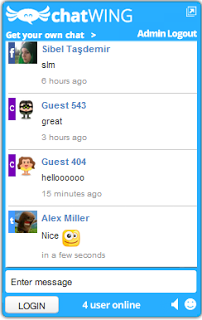
That's it, now visit your blog and you will see an amazing chat box appearing perfectly!
The Blogger Mobile templates is something pretty cool, and blogger provides you with 27 mobile templates to choose from. You cannot completely customize the mobile template(as of now) but you can pick any of the available templates.
All of these templates come with Post Thumbnails, and a custom excerpt rendered using the data:post.thumbnailUrl and data:post.snippet variables. These templates also support the swipe navigation. You can swipe left and right to move across pages on your Touch screen mobile

Here is a preview of how this Blog looks on a Samsung Galaxy S2

bloggerplugins.org_on_sgs2
Lets see how we can change the blogger mobile template
1. Login to Blogger in Draft : http://draft.blogger.com
2. Go to the Template Section
image
3. Click on that button below the mobile version
image
3. From the next screen you will be able to enable the mobile template, and select the template which you like. Use the drop down and the slider to pick the perfect template
image
4. When you are done selecting the template, Click the Save button.
You might have noticed a QR code on the Template Selection Screen. Scanning this from your mobile will take you directly to the mobile version of your blog.
If you visit your blog from your mobile, you should be automatically taken to the mobile version of your blog.


        Blogging has become so popular these days to the point that nearly everyone in the world owns a blog. They are very easy to create that even an eight-year-old kid could setup one in minutes. People set up blogs for so many reasons, but one thing that is certain about all online bloggers is that they all want their blog to be successful. This is exactly what we're going to look into in this post.

Being a successful blogger isn't just about having an attractive template or by making use of the best blogging platform. There's more to that. Whether you're blogging to make a living from it or you are just blogging for fun, the success of your blog is dependent on its ability to reach out to its desired audience.

In some quick short notes, let's take a look at some tips on how to become a successful blogger in 2013;

1) STANDOUT: Nothing sounds better than being an authority in your niche in your own unique way. Many people often overlook this. To be successful online, you must find a winning technique and apply them. People need to discover you, love you, and keep returning for more if you provide the necessary information they need.

So in order to stand out, you need to work on the uniqueness of your writing style, the way you deliver the information to your audience and how you brand yourself.

2) SOCIALIZE: No one is, would, and will ever be an island of ideas that is why the word "share" is in our dictionary. As an online blogger, you can't know it all in your niche. There are a lot of people in your niche whom you can contact to share ideas or you follow their blog to stay in touch.

Although, in some cases, what works for Mr. A may not work for you but knowing how Mr. A did it could enlighten and motivate you to become better knowledgeable. The word "learning" is a continuous tense so, the more you interact and share ideas with people in your niche, the better you develop yourself as an authority in your niche.

3) PROMOTE YOUR BLOG: The lifeblood of every business is traffic. If you cannot get people to find your site, even the best template/design won't get you anywhere near there. Publishing articles and press releases, using video sharing and social media sites, to mention a few has made it a lot easier to promote websites/blogs online.

The only issue you'd need to consider when promoting your blog is your SEO approach. The search engines have gotten a lot smarter than before so ensure you read about some SEO tips before you embark on attempting them.

4) GUEST POST ON OTHER BLOGS: Your blog seems kicking on a good note, but you have to bear in mind that there were people in the niche before you came up. Guest posting on other people's blog helps you expose your blog to a whole new audience different from your regular visitors. You not only get to find new readers for guest posting on other blogs, it also helps increase your blog traffic.

Another great thing you gain from guest blogging is backlinks as the owner of the blog may be kind enough to let you put one or two links back to your blog.

So, if you hope to blog for the big bucks, being a successful blogger isn't going to be much of a headache following these easy steps. They are tested and proven methods that cover all aspect of becoming a success in blogging. Take a bold step and try them out. I promise you'd return later in the future to give kudos to this blog.

Thank you for reading this article, I hope this will help you To your success.