WHAT'S NEW?
Loading...
Showing posts with label Google. Show all posts
In this post, I am going to show you "How to find your phone's location, play ring to it and erase data from the internet". Everybody loses their mobile phone, and this trick is very helpful for those who lost their cell phone often. It's a new feature of Google; it just released before ten days by Google. Now, Google will help you to find your phone’s location and, more importantly, you can Erase your Android phone’s data direct from the net, or you can play ring to your mobile from the internet. All you need to do is, its Mobile data connection is ON.



Users of this service (Google Android Device Manager):
  • You can ring to your mobile from anywhere from The Internet.
  • You can see your phone’s location and full address from The Internet.
  • You can erase data on your phone from The Internet.
  • Remotely access your Android device from The Internet.
Note: These trick will work only for Android mobiles.
To find your phone's location, play ring to your mobile and erase data from the internet, please follow these steps:
  • First, Your Google account must be synchronised in your Android phone. If Not so, then do synchronise first.
  • Now, It will ask you for login. Login with you Google account details (must Enter Synchronised account details).
  • Now You will see something like the following Image.
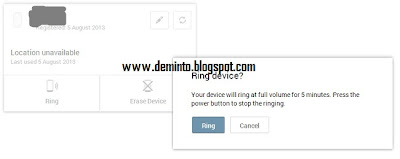
  • Click on Ring icon to ring your Phone
  • Click on Erase device to Erase data on your Phone.
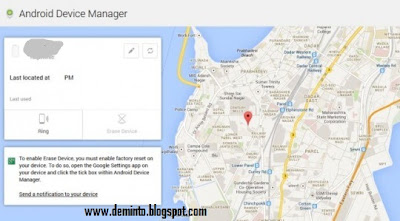

  • Click on Locate My Device to get the location of your device.

If you face any problem or any doubts, please comment below and I will respond to it. Please share this post if you like this post. Thank you for reading this post keep visiting

In this post, I am going to show you "How to use Firefox or Google Chrome as a calculator". Mozilla Firefox and Google Chrome are the two best web browsers in the world. These two web browsers do not only let you browse the internet but also you can do some other stuff. In this post, I am going to show you how to use the Firefox and Chrome for calculating numbers.

Firefox Google Chrome


To calculate numbers in Firefox then, follow these steps:


Press "Ctrl+shift+k" to open web console.

Just write down the numbers you want to calculate and Hit Enter. For example 10+20.
Now, you will get the result as shown in the picture below.

Use Firefox or Google chrome as a calculator


To calculate numbers in Chrome then, follow these steps:


Press "Ctrl+shift+j".

Just write down the numbers you want to calculate and Hit Enter. For example 16+26.
Now, you will get the result.

If you like this post then, please share it. If you face any problem, please comment below and I will clear your doubts.


Firefox and Google Chrome are the two best browsers in the world; they are very fast and easy to use browsers. If you love Firefox's speed and Add-ons but not the look, and you want to change it to look like Google Chrome, then this post will be very helpful for you.

Firefox and Google Chrome


If you want to make Firefox look like Google Chrome, then follow these steps:
  • That's it; now your Firefox browser looks like Google Chrome.

If this post helped you then, Please kindly share this post and spread our voice. If you face any problem, Please comment below and I will clear your doubts.


Are you feeling bored? Lets play Pacman on Google. This is a doodle.
  • First, go to Google.com
  • Type Google Pacman and click on I'm feeling lucky.
  • Start playing!
 To get more and more google tricks go to this post ===>  HERE
 
Facebook security is increasing day by day. You might not able to see your friends email address if he/she has set the privacy settings to only me. But, here is the trick to get their emails.


  1. You need a yahoo account.
  2. Log in into your account.
  3. Go to address.yahoo.com and then click the Facebook icon. 
  4. click on import now for importing your contacts.
  5. you can see icons of facebook, Gmail, hot mail, etc.
  6.  select facebook by clicking in facebook logo and login to your facebook account.
  7. Once the import is done, click this link to download a CSV file with the email addresses of all your Facebook contacts to your desktop.
  8. You can then import the CSV file into Gmail Contacts, LinkedIn, your phone address book or any of the social sites.

    Note: If Yahoo! is unable to import your Facebook Address book, open your Facebook page and choose “Application Settings” under Account. Next remove the “Yahoo! Contact Importer” application from your Facebook profile and try the steps mentioned in the video again.


Somebody needs to copy content from any website but, some of the website owners has disabled the right click and selection feature. how to copy protected content in website or I can say tip to copy any websites content. we can copy content by disable the java script in your browser. Now i am going to show how to disable the java script in firefox and chrome browsers.

To disable JavaScript in Firefox:


  1. At the top of the Firefox window, click on the Firefox button and then select Options
  2. In the Options window, select the Content panel
  3. Disable JavaScript: Select this option to permit JavaScripts to execute on your computer
  4. To change advanced settings, click Advanced.
  5. Click OK to close the Options window.
 To disable Javascript in chrome:
  1. In top-right corner,click on setting icon and click on option to open option window.
  2. Now, In option window, click on “under the bonnet” option of left panel.
  3. Now in Privacy section,click on Content settings.
  4. After that in javascript radio button,check the “Do not allow any site to run JavaScript

HitLeap Best Auto-surf hits exchange HitLeap.


What is Hitleap?

HitLeap is a free traffic exchange website. It allows you to bring new visitors to your website and the best part is that it is free. HitLeap was once known as TrafficSpammer .In Mid 2012 the old site launched with a new domain and script. HitLeap is a auto traffic exchange where users earn traffic minutes for viewing other people's sites automatically.
To go to hitleap's website, click on the image below, it opens in a new tab.

HitLeap Traffic Exchange
  
How does it work?


After signing up, you will submit all the websites you want to send traffic to.
Then you will earn free traffic by viewing other people's websites.
Alternatively, you could buy a traffic package from us.


HitLeap has a software or you can surf from Mozilla Firefox and earn minutes and meanwhile you'll be getting the hits. If you surf by hitleap Viewer (hitleap software) you can earn 20% extra.


Is it safe for adsense websites?

yes, it is safe for adsense websites.If you have an AdSense website and want to increase traffic, be safe and earn some money, HitLeap is the best choice.

When you submit your webpage to Hitleap, you have an option to hide the traffic source. Since you are hiding the source of traffic, AdSense and Google will not notice that the traffic is coming from a traffic exchange site.

how many websites you can send traffic through hitleap?

HitLeap is a free traffic exchange site and as a free member you can add up to 4 websites.If you have more than for sites to add, you can get a cheap monthly subscription. Find out the monthly rates here.

HitLeap Traffic Exchange

Introduction to Google Translate 


Google Translate is a free translation service that provides instant translations between 64 different languages. It can translate words, sentences and web pages between any combination of our supported languages. With Google Translate, we hope to make information universally accessible and useful, regardless of the language in which it’s written. click here to go to Google translate.


How does it work?

When Google Translate generates a translation, it looks for patterns in hundreds of millions of documents to help decide on the best translation for you. By detecting patterns in documents that have already been translated by human translators, Google Translate can make intelligent guesses as to what an appropriate translation should be. This process of seeking patterns in large amounts of text is called "statistical machine translation". Since the translations are generated by machines, not all translation will be perfect. The more human-translated documents that Google Translate can analyse in a specific language, the better the translation quality will be. This is why translation accuracy will sometimes vary across languages.
 
Google Translate currently supports 64 languages:
  • Afrikaans
  • Albanian
  • Arabic
  • Belarusian
  • Bulgarian
  • Catalan
  • Chinese (simplified)
  • Chinese (traditional)
  • Croatian
  • Czech
  • Danish
  • Dutch
  • English
  • Estonian
  • Esperanto
  • Filipino
  • Finnish
  • French
  • Galician
  • German
  • Greek
  • Hebrew
  • Hindi
  • Hungarian
  • Icelandic
  • Indonesian
  • Irish
  • Italian
  • Japanese
  • Korean
  • Latvian
  • Lithuanian
  • Macedonian
  • Malay
  • Maltese
  • Norwegian
  • Persian
  • Polish
  • Portuguese
  • Romanian
  • Russian
  • Serbian
  • Slovak
  • Slovenian
  • Spanish
  • Swahili
  • Swedish
  • Thai
  • Turkish
  • Ukrainian
  • Vietnamese
  • Welsh
  • Yiddish
Current alpha languages are:
  • Armenian
  • Azerbaijani
  • Basque
  • Georgian
  • Gujarati
  • Haitian Creole
  • Kannada
  • Latin
  • Tamil
  • Telugu
  • Urdu
Google Translate tests other languages, called "alpha languages", that may have less-reliable translation quality than our supported languages. We are always working to support other languages and will introduce them as soon as the translation quality meets our standards. click here to go to Google translate.
Google is really taking Indian Market very seriously – According to an announcement today by Google has launched India Get Your Business Online initiative that will offer Indian Small & Medium sized Businesses completely free website along with a .in domain name.
Additionally, this initiative offers businesses free Email Addresses backed with 365-day support. Essentially, everything that you will need to get your business online.
Given the potential of growth in India – Google has played a master-stroke here by making it absolutely easy for Indian Businesses to come online.

How to avail free Website / domain offer from Google

Just head over to India Get your Business Online website, choose your domain name, fill up a form giving some of the details and you are done.


What all things do you get?

  • Free: It’s free to set up your website. The domain is free for 1 year, and it’s free to maintain your website for 12 months. 
  • Quick: The website tool takes 15 minutes from sitting down to being found online
  • Easy: You don’t need to be a tech whiz to get started. All you need to start is your address, phone number, TAN/CIN or PAN to verify you as a business
  • The website is simple because customers are looking for simple information online
  • Gives you your own .in domain
  • Other features include photos/logos, integration with social media platforms
  • You get a Google Apps account – free personalized email ids
  • If you want to make your website work harder, you’ll have access to steady stream of free tips and tools from the Getting Indian Business Online team and a free coupon of worth Rs. 2500 INR advertising trial from Google AdWords to help promote your site.
  • After the first year, SMBs can choose to pay a monthly pay-as-you-go to maintain their website using Hostgator.
  • At the end of the first year, they’ll have to pay a nominal charge if they wish to renew their domain name. They can cancel their website at any time
Google's I'm feeling lucky button is nothing but a shortcut button which will take you to the first link from the search results directly.
Here are the top 10 Google I'm feeling lucky tricks.

1- Go to Google.com, type Google Gravity and then click on I'm feeling lucky: This will create a gravity on your screen and the Google's page will fall down. You can even throw them using your mouse.


2- Go to Google.com, type Google sphere and then click on I'm feeling lucky: This will make all the words fly in a circular motion.

3- Go to Google.com, type Google Hacker and then click on I'm feeling lucky: This will convert all the words into hacker language.

4- Go to Google.com, type Annoying Google and then click on I'm feeling lucky: This will convert all the alphabets into upper case and lower case randomly.

5- Go to Google.com, type Google Loco and then click on I'm feeling lucky: This one will make Google dance.

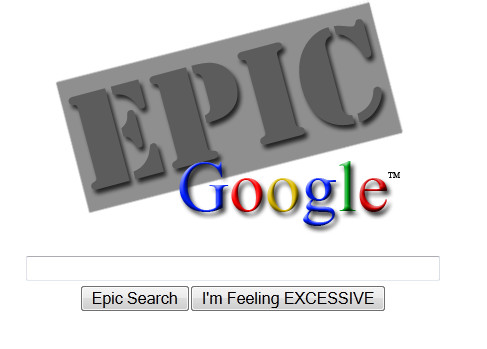
6- Go to Google.com, type Epic Google and then click on I'm feeling Lucky: After using this trick, you will notice that the size of the texts has started increasing.

7- Go to Google.com, type Who's the Cutest and then click on I'm feeling Lucky: Check out Who's the Cutest according to Google.

8- Go to Google.com, type Google reverse and then click on I'm Feeling Lucky: This will take you to a page where everything will be in mirror image.


9- Go to Google.com, type Google Rainbow and then click on I'm Feeling Lucky: This will create a rainbow in Google's homepage.

10- Go to Google.com, type Google Pirate and then click on I'm Feeling Lucky: Take a look at the Pirate version of Google.