WHAT'S NEW?
Loading...
Showing posts with label social networking. Show all posts
Facebook is the Best and No.1 Social networking site in the world and Every 1 out of 3 people in the world uses a Facebook account. It has 850 Million active usersYou can use FB fast by using Shortcut Keys. Below we are posting the Shortcut Keys for Two popular web browsers Mozilla Firefox and Google ChromeKeyboard shortcuts help you to do things quickly.


amazing facebook shortcut keys


Facebook Shortcut Keys for Mozilla Firefox:

amazing facebook shortcut keys

New message = shift+Alt+m
Home page =  shift+Alt+1
Profile page = shift+Alt + 2
Friends list management =  shift+Alt + 3
All the message list = shift+Alt + 4
List of notification = shift+Alt + 5
Account setting page = shift+Alt + 6
Privacy setting page = shift+Alt + 7
Visit Facebook Fan page = shift+Alt + 8
Facebook Policy Page = shift+Alt+ 9


Facebook Shortcut Keys for Google Chrome:

You just need to remove shift before all the shortcut key used for Mozilla Firefox.

amazing facebook shortcut keys

New message = Alt+m
Home page = Alt+1
Profile page = Alt + 2
Friends list management = Alt + 3
All the message list = Alt + 4
List of notification = Alt + 5
Account setting page = Alt + 6
Privacy setting page = Alt + 7
Visit Facebook Fan page = Alt + 8
Facebook Policy Page = Alt+ 9

Note: You must be logged in Facebook and stay in the Facebook tab of your browser to use the shortcuts for both browsers.


Cool ! Isn't it? Just go to your Facebook account and give it a try!


Please share this post with all your loved ones to share the knowledge the way we did. It's the only favor we request in return. If you have any doubts in your mind then, please comment and clear your doubts.
Everyone was looking for Android operating system phones by seeing its popularity and cheapest rates. There are three top messengers by its popularity, According to me you should have all those apps. From Android messengers, you can make free call, free SMS, free Video calls, and send photos and videos. No one likes to send a text message from a phone. The benefit of instant messengers you can use them whenever and wherever. So, without wasting your time let’s go to our new post "Top messengers for Android phones". I hope you like it and enjoy it.


WhatsApp Line Wechat

WhatsApp
  • Whatsapp is the father of instant messengers.
  • From WhatsApp, you can quickly send a text message, video and photos, etc.
  • Whatsapp hits more than 1 billion per month users.
  • It is popular than Twitter and king of all.
  • You much have this app on your android phone.The WhatsApp is free for one year then you need to pay a small charge for it $0.99 per year.

Wechat

  • Wechat is also free instant messages available for Android phones.
  • It gives to his users send a voice message and video message.
  • It's tagline ‘ We love We chat ‘ that means everyone like wechat messenger.
  • It also gives his user to send emotions.
  • There are lots of emotions available on wechat.

Line

  • Line is also a good instant messenger for Android phones.
  • The best thing of Line is Free voice calls.
  • Line have rated 4.1/5.0 according to google play store.
  • It gives to his user's free text message, Audio message, video call and much more.
  • You can send stickers to others.
  • That means this messenger is good and loves by his users.

That’s it. All best instant messengers are above according to me, and it’s users. All the apps above you can download all from google play store at free of cost. Hope you like this post, and soon we’ll come back just for you. Any doubts, please comment. Please share this post.
I am back with a new post. In my previous post, I have shown you "Access Facebook on any Mobile Without Internet connection" As we all know Facebook is one of the best social networking site in the world and growing day by day. Everyone wants to create an account on Facebook. Personally, I also have an account on Facebook and using daily and having lots of fun with my friends. Today’s Facebook have two Billion users in the world. Some people using Facebook only for chatting with his Friends and some people use for Facebook much other reason, we can’t say about it. Facebook updates brand-new features for his users for make more attractive.That’s means Facebook is also a vital part of our life- that’s my thinking. Everyone wants to create a cover of his profile, is it not easy. But here at Deminto, we’re providing to our visitors through this post. In this post, I am going to show you "Facebook cover and profile picture maker". This trick is very simple and easy to use.

facebook fb


There's a website which is called timelinecoverbanner.com which is the cover and profile picture making site. Go to that website and create your own professional cover and profile picture WITHOUT any Branding or advertisement watermark for free! Hurry go to timelinecoverbanner.com

Facebook Cover and Profile Picture Maker


Features:

  • No visible watermark or branding on the final image.
  • Very fast and responsive.
  • You can blend profile picture seamlessly with timeline cover background or in other words you can make your profile photo and cover look integrated into one image, you draw or add text and much more.
  • We also have tons of cool graphic clip art from our partner sites which exclusively available only for our cover editor.
  • You just need to browse them and copy paste the GRAPHIC ID of your desired image to our editor, and,.. presto!.. your chosen graphic is added and ready to combine with your photo.

Hurry go to timelinecoverbanner.com and create your cover and profile picture.
Do you like this post please share this post. Any doubts, please comment in comment section.
In this post, I am going to show you "WhatsApp Vs WeChat". These apps have very severe competition in between. Firstly WhatsApp supports only text message but, now it supports voice message because the WeChat support voice message. So there is an enormous competition between both apps. WhatsApp also launched Video Calls for Windows Users. And, it's planning to launch this feature in all platforms. Many users don't want to show their identity in WhatsApp. So, they can "Download Cool Profile Pictures for WhatsApp".  Now, let’s see who’ll better according to us.


WhatsApp Vs Wechat

WhatsApp:
  • The WhatsApp is A very popular Android app which giving many features on it.
  • The Whatsapp support voice message, text message and you can also send your photo and videos.
  • You can use WhatsApp free for one year then after you need to pay 0.99$ per year, I think it is nothing by seeing its features. We can spend this amount happily for one year.
  • WhatsApp is available for Android, Nokia phones, IOS, Blackberry, etc.
  • You can download it from Google play store and Nokia OVI store and also from WhatsApp official website.

WeChat:
  • The new WeChat is also an attractive and good app. The WeChat support voice messages and stickers.
  • From WeChat, you can send your voice messages to anywhere to your friends.
  • The WeChat also supports video messages. The WeChat is a free app. You can download it from Nokia Ovi store, Google play store.
  • The WeChat is available for s40, Android, Blackberry, iPhone.
  • The WeChat newest Android version is 6.3.15.
  • The WeChat 1.5 for S40
  • The  WeChat 1.1 for BlackBerry 10

Now, Whatsapp has 1 Billion + million active users.
We think Whatsapp is better then Wechat but it unusual in feature to see who will win but, now according to us Whatsapp win. Please comment which is best according to you. Let us know who is better according to you in Comment section.
In this post, I am going to show you "Access Facebook on any Mobile Without Internet connection". Do you have an old mobile phone, like the Nokia 1100, or even it is a black and white mobile that has no browser and can do little more than make phone calls? Or are you stuck in some remote place where there’s no Internet or no other form of data (EGDE/GPRS/3G) connectivity is available?


facebook without internet

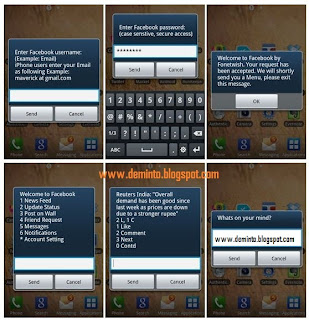
Not a problem. You can still use your Facebook account in India by dialing *325# (or *fbk#) from your mobile phone – this service requires no data plan or The internet, and it will even work on phones of the Stone Age.

facebook without internet


Facebook India has partnered with Fonetwish to bring Facebook on every mobile phone without requiring any apps or even the Internet.


You dial the *325# number, then enter your Facebook username and password, and you are in. You can then send number based commands to access various features of Facebook, chat with friends who are online, add new people to your buddy's list and more.


THIS APP WILL RECEIVE:
  • Your basic info.
  • Your email address (user_ID@_mail.com).
  • Your profile info: description, activities, birthday, education history, groups, hometown, interests, likes, location, relationship status, relationship details, religious and political views, website and work history.
  • Your stories: events, notes, photos, status updates, and videos.
  • Friends’ profile info: descriptions, activities, birthdays, education histories, groups,       hometowns, interests, likes, locations, relationship statuses, relationship details, religious and political views, web sites and work histories.
  • Stories shared with you: events, notes, photos, status updates, and videos.
  • Access to post on your behalf.
  • Access to messages in your inbox.
  • Access to posts in your News Feed.
  • Access my friend requests.
  • Permission to publish check-ins on your behalf.

It may be too much work to read your Facebook news feed stories one by one, but this is a good option to update your Facebook status quickly or for chatting with friends who are online. The price is reasonable too – you just have paid a subscription fee of 1.00 per day for unlimited usage. Please share this post.
In this post I am going to show you "How to get free facebook page likes faster" If you are searching for any trick to get free Facebook Likes, Facebook Shares, Facebook Followers, Facebook Post Likes, Facebook Post Shares, Google Circles, Twitter Followers, Twitter Tweets, Twitter Retweets, Twitter Favorites, YouTube Views, YouTube Subscribers, YouTube Likes, YouTube Favorites, Pinterest Followers, Pinterest Repins, Pinterest Likes, Reverbnation Fans, SoundCloud Follow, SoundCloud, StumbleUpon, MySpace Friends, Instagram Followers, Instagram Likes, Vkontakte Pages, Vkontakte Groups, Website Hits, then you came to a right place. This trick is 100% working, and it's not spam. Addmefast is free social exchange network which helps you grow your social presence.


Facebook Page Likes


To get free facebook likes etc.. faster, follow these steps:

  • First of all, you have to create an account in Addmefast, to create an account click here and signup.
  • After signup click on Add site/page button.
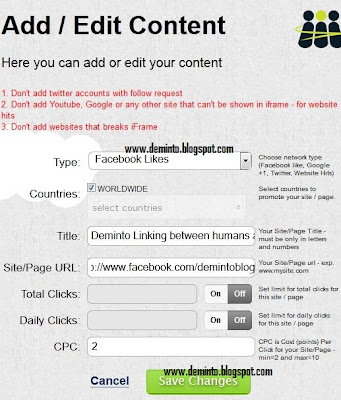
  • After clicking, in the Type field, select a type that you want to increase likes (for example facebook likes, twitter followers) as shown in the below picture.
Addmefast Facebook Page Likes

  • In countries field, select worldwide ( to get likes from everywhere in the world).
  • In title field, fill name of your page or anything you want.
  • In "Site/Page URL" write in URL or username/ID of your page.
  • Leave Total clicks and Daily clicks field as OFF (to get unlimited likes ).
  • In CPC {cost (points) per click} fill anything you want (If you type 2 means 2 points will cut from your account when someone like your page)
  • Click on save changes button.

How to get points?

  • Click on Free points and then click anything you want (for example facebook likes, twitter followers)
  • You can get free points by liking/following/viewing/subscribe the others pages/accounts/videos/profiles/music.
  • After you have clicked (for example liked, followed, etc.) 20+, click on "daily bonus", and you will get 150 free points.
  • You can also get points by your referrals, To get points by your referrals go to the left bottom of your page and you will see many options. You will get 200 points per referral.
It is working very fast, If you find this post useful, please share this post. If you face any problems, please comment below.

In this post, I am going to show " How to open multiple Facebook account on Firefox". This trick will only work's on latest Firefox version (nighty 20).

Firefox


To open multiple facebook account on Firefox nighty 20, follow these steps:
  • First, open Firefox.
  • Now, click on the menu and then click on 'New private window'.
  • Now, a new window appears with a purple color menu.
  • Now, you can access both Facebook accounts at a time.
  • You can use this trick to open multiple Google+, Orkut, Gmail, Yahoo and other sites.

If you face any problem, please comment below.
Thank you.
Facebook is an Ultimate social networking site. In this post, I am going to show "How to Like All Facebook Status in Just One Click". If you have too many friends and want to like all status and comments in just single click, then try this trick. Because it's too difficult to like the status of your all friends in few seconds, and your friends always tell you to like their status and comments but if you don’t have time to like all status then try this trick. This trick is too easy, and this method will work only on “Firefox”.
This trick starts from here:

Facebook Auto Like


To Like all Facebook status/photo in just one click, follow these steps:
  • First of all, make sure you are using Firefox.
  • Then, Install GreaseMonkey add-on on your Firefox browser.
  • Restart your Firefox browser.
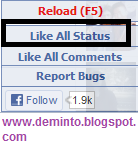
  • Now, visit your Facebook account and you will see a new small box appears at the left side, bottom of the page where you will see the options "Like all status, Like all comments".
Like All Facebook Status in Just One Click

  • Click "Like all status" to like all status. Click "Like all comments" to Like all comments. And sit back and relax and see the magic.
  • That's it.You are Done.

Do you love this post? Please Feel free to share this post.
Facebook is the no.1 online social networking site. In this post, I am going to show "Trace a Facebook user location while chatting". This method is very easy to find the location by using IP address. Tracing Facebook user location is crucial by knowing unknown person location.


Facebook


To Trace a Facebook user location while on chat, follow these steps:
  • First, you want to find out the IP address of that User.
  • So you want to know the IP address of a particular person on Facebook or Orkut or any chat service, there is only one way is just invite him for a chat.
  • While chat is ON open ‘ Command Prompt ‘ on your PC (Start >Run >command prompt). Note: before trying this make sure you close all the other tabs in your browser and only Facebook is open. Also, if possible delete all the history and cache from your browser.
  • Now open the command prompt then Type "netstat -an" without quotes and then press Enter.
  • And you will get all established IP addresses. Note or save the all suspicious IP’s to your notepad.
  • The Next step is to trace that user location by using IP tracing sites.
  • Click here and go to that website and paste the IP address. Now, click Trace IP.
  • Now, it will show you the location of that user.


It will show you all the information about that user. Use this facebook trick if you are in a problem with some unknown person.
In this post, I am going to show "how to add up to 50 tags for a picture in facebook using mobile". Tagging is most widely used on Facebook. But, the Facebook is only providing limited tags for using mobile the Facebook allow only to add five tags and using a computer, maximum tags is 50.

So what is the solution for mobile users?

Facebook

The trick starts from here:
To add up to 50 tags for a picture in facebook using mobile. Follow this steps:
  • First, Download the Facebook mobile application in your mobile. (To get this application go to your default browser then open facebook login page. Now you see the ad of Facebook application. Click on it, To download the Facebook mobile app.)
  • Now upload your photo from any mobile browser in your phone.
  • Then press add tag and select a maximum number of 5 people.
  • Now go to your Facebook application and login with the same id.
  • Click the “Photos” option in the application. And Select recently uploaded image from the image album.
  • Now go to “Options” and hover the “tag Option”.
  • That's all now Just try to add all of your friends.
Now you are tagging the more people, and you get more likes.

That's it. Please share this post below and let your friends know.
Hello deminto’s visitors. Once again I’m back just for you. So, today I come with a great trick, i think everyone looking for that. Let’s take a look of new article.”How to Put a Photo Under Comments on Facebook”. As we all know Facebook is one of the best social networking site in the world and growing day by day. Everyone wants to create an account on Facebook personally i have also an account on Facebook and using daily and lot’s of fun with my friends. Today’s Facebook have 100 crore users in the world.Some people using Facebook only for chatting with his Friends and some people use for Facebook many other reason ,we can’t say about it. Facebook updates new-new features for his users for make more attractive.That’s means Facebook is also very important part of you life- that’s my thinking.


Now you can easily upload photos on any status but previously ,first you need upload your image on any online cloud storage then you can paste you url link on that post. Today Facebook launched new feature, now you can add directly photos from comment section.
  • First see this image:

  • You will  notice here option like camera.
  • Now open facebook by only click here (Make sure you already log-in ,if you don’t log-in please log-in your fb account account and then click here.)
  • search for any post and go to near comment section.
  • If you find the option like camera as seen on photo at step one click on that icon.
  • Now your computer hard disk open and you select your image.

That’s it!! All are done by you. I think this tip easy and you can do it without problem.
World's #1 social network Facebook has updated a new design on it's news feed .Facebook developer team regularly introduce new features to keep it's current place among social network sites. Now they have concentrated on Facebook news feed. It has recently launched the brand new look for its News Feed. Here is the method on how you can get Facebook news feed. The Facebook News Feed looks much better than old News Feed. Facebook has brought Facebook News Feed with many cool features, it is completely different from its old version. Some of the basic thing has been changed in Facebook new News Feed such as photos, videos, font size, stories and more. But it’s hard to discover until you are and active Facebook user. Earlier, all the stories appeared in your news feed but now Facebook allows you to filter stories with following options.


All Friends - a feed that shows you everything your friends are sharing.
Photos - a feed with nothing but photos from your friends and the Pages you like on Facebook.
Music - a feed with posts about the music you listen to music which your friends listen to.
Following - a feed with the latest news from the Pages you like and the people you follow.

As Facebook has not made such a option to get Facebook new News Feed in a single click. Here you have no option, where you can get new Facebook News Feed by only one click.

Facebook shows the same view in whatever you log with like mobile devices, tablets and desktop versions with this useful new feature. All the Facebook users can get this new design in upcoming weeks. However, you can get the Facebook new News Feed by joining the waiting list. If you want to get this new feature soon on your Facebook account, then follow the given steps below.
  • Sign-in to your Facebook account.
  • Click here to go Facebook News Feed.
  • Now, scroll down the windows to bottom.
  • After that, click on Join Waiting List button.


You have done! Now wait, you will soon get a notification on your Facebook Profile page when you get new Facebook News Feed.
An Indian Guy just designed a free online secure software to give me free status or pic like that I am going to share with you here. If you want to get 50+ likes for your photos or status on Facebook, then you must try this one. Believe me; you will get more than 50 likes in just a minute. I have tried this trick on my own picture and status, and the result was unbelievable, I got 64 likes in just a few minutes, and it's not even spam. If you too want to get a huge amount of like for your photo or status, then just follow the below steps.

Facebook Like

*First
  1. Make sure people can Follow to you. Enable Followers, Click Here and Select EveryBody in Who can Follow Me.
  2. Make sure the status/photo you want to get like is set to Public.
  3. You must be logged in to your Facebook account.
Now, let's start:
  • Visit the website djliker.com
  • After visiting, get the Access Token by clicking on the Click here link which says "Click here To Get The Access Token,.......".
  • After clicking on the "click here" link, a new tab will open where you will get the access token, and the access token is the URL. Just copy the URL, which will be similar to the below link.
Note: After clicking on Click here, if you see a page which has an install button at the top right side, then just click on that Install button and then you will get the access token.
 
http://www.facebook.com/connect/login_success.html#access_token=AAABempp6
Ls0BAP4PWUIqzISIfjZClm0SxRhJAoBtpxZBZAI5DhX0tNB8ozK2855OmOp7gbBokOFy
hKw4115hQSoAas96WVS206CscNwGQZDZD&expires_in=0
Facebook AutoLiker Access Token

  • Now just paste the URL in the Access Token submission box which will be on the homepage and then click on Submit.
  • Now you will be redirected to another page where you will see your recent status updates with a Submit button at the right side. Just click on the Submit button and you are done. (Do not refresh the page).

Facebook AutoLiker
  • And if you want to increase likes for a Photo, then click on the Photo tab and then click on the Submit button of any of the pic you want.
  • That's it! You are DONE...! You will get more than 50 likes to your status.
While authors blog for various reasons, one of the most common factors of blogging is the desire to get the word out.


One way to increase your blogging audience is to publish the articles you write on your blog to your Facebook fan page(s) or personal page. Let me share with you one of the ways you can publish your blog articles to Facebook automatically when you post.

Just follow the steps:-

  • First of all go to the RSS Graffiti Beta 2.0 page. Click here.
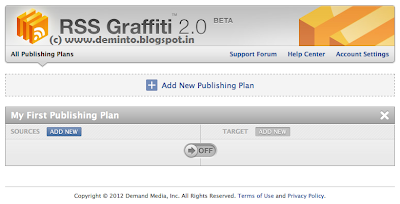
  • Click on Add New Publishing Plan. Then enter your blog's name and then click on Create Publishing Plan.
 
  • Now click on ADD NEW in the SOURCES section. 
  • Enter your Blog's or Website's URL and then click on Add Source.  
 

  •  Now in the Feed Setup section,no need to write or change anything. But in SCHEDULING section, set Update Frequency as As soon as possible, Maximum Posts Per Update as System Maximum and Post Order Per Update as Publish older posts first and then click on Save.
  • Again click on ADD NEW, but this time in the TARGET section.
  • Now in the TARGET SETUP, Select your fan page in the Choose Target option and again select your fan page in the Publish on Behalf of option also and then choose your POST STYLE (you can choose any one from the three options) and then click on Save Changes.

  •  Finally, enable your publishing Plan.


That's it! Now whenever you will update a post on your blog, it will be automatically posted in your Facebook fan page within few minutes.
Facebook is one of the top social website and is mostly used by that people who are habitual and regular user of internet. Most of the colleges, schools, and offices, WiFi block you from using facebook. Facebook provides many facilities to the people like instant messaging, photo sharing and also a good way to pass a time and to remain touch with friends but as this is social networking website so our colleges and universities even offices are not happy to see us surfing at time of studies or may be due to some other reason Facebook is blocked on network by admin. 
 So at this time you will need a way to by pass this security and open Facebook which is blocked. 


Before trying these try fb.com instead of facebook.com.
Trick 1: Short URLs
Use URL shortening services like goo.gl or bit.ly.


Trick 2: Use VPN
A VPN service will definitely work. Install this free VPN service called Proxpn.


Trick 3: Using IP
To find  IP Address of Facebook  follow steps.
Go to Start >> Run or search these:
Enter Following Command.
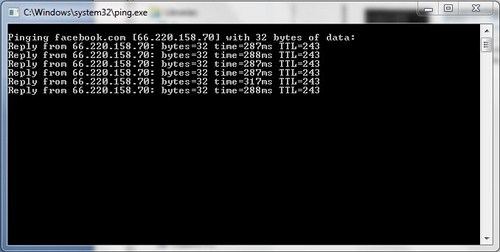
Ping facebook.com –t
Suddenly following window will open and some lines will be shown like below 
   
This is IP address of Facebook now you just have to enter this address in browser where you write address before paste this IP address there and hit ENTER. That's all now Facebook will be opened in a network where it is blocked
 

Thats it Stay Connected!! Have Fun!!


Facebook has provided an option to insert smiley on Chat. But, they don’t allow to insert your picture. Here is a guide to insert any picture in Facebook chat like smiley.
The default Facebook smileys/emoticons are very common. Why not use something special and unique! Do you know that you can make your own Facebook emoticons withing a few seconds? Let me show you how:

  • click the Browse Button. Then choose the Image that you want to make it as smiley.
  • And Click Upload Now Button.
  • Then it will display a message, “Uploading. Please be patient, it may take several minutes.”
  • After a few seconds it will display the code for your picture.
  • And, copy all the code and paste it in chat. 

This is one of the best facebook tricks. It changes color of the text in your facebook status.You can amaze your friends to post status updates, comments or messages in blue text.
  • Go to Facebook.com and Login with your account.
  • Now go to update status link and paste below code, and change the text saying YOUR TEXT HERE with your own text you want in blue color like.
@[1: ]@@[1:[0:1: Your Text Here ]]

  • Now after you have done writing your text, click on Post. you will have your status in Blue Color.  
 
So, enjoy impressing your friends on Facebook and do share this trick if they ask you how its done.

Facebook security is increasing day by day. You might not able to see your friends email address if he/she has set the privacy settings to only me. But, here is the trick to get their emails.


  1. You need a yahoo account.
  2. Log in into your account.
  3. Go to address.yahoo.com and then click the Facebook icon. 
  4. click on import now for importing your contacts.
  5. you can see icons of facebook, Gmail, hot mail, etc.
  6.  select facebook by clicking in facebook logo and login to your facebook account.
  7. Once the import is done, click this link to download a CSV file with the email addresses of all your Facebook contacts to your desktop.
  8. You can then import the CSV file into Gmail Contacts, LinkedIn, your phone address book or any of the social sites.

    Note: If Yahoo! is unable to import your Facebook Address book, open your Facebook page and choose “Application Settings” under Account. Next remove the “Yahoo! Contact Importer” application from your Facebook profile and try the steps mentioned in the video again.


“Fake wall posts” are some sort of images which look similar to the facebook conversations, you can create images as if someone had a commented on any status and had a conversation over there..

Confused??

OK , Now I know that, even you are interested to create such Fake wall post; I don’t want you to wait any longer here you go…..................

How to Create Fake Facebook wall post:

Things  you need:

  1. A creative concept or conversation to surprise your friends.
  2.  Image of people if you want to add them in conversation(not needed if they are in your friends list).
  3. Finally, you need a Facebook facebook facebook facebook facebook facebook account (confused you need only 1 account).

Here is the procedure to create Fake Fall posts:

1. First Go to http://wallmachine.com
2. Click on  “Facebook (F) Connect” to log in into your Facebook account. 
    Now it will automatically redirect you to a page where you can create fake wall posts as you wish.
3. Now this is how the page look like and check the image to know how to edit it…!
You can just double click on the text to add your own Text.
and for images click on the image and choose “ Facebook friends” to get their images in a easy manner.
If you want to upload some others pic who is not there in your friends list then you can click on the image and upload an image by selecting “ upload image “
4. Now you can simply take a screen shot of it and you can even prank your friends with funny conversations.
Just try to create fake post and You will love to see good response from your friends
Chatting is one of the features of Facebook. It is only possible while you and your friend are online. Else you can send message to your friend that will get him/her while opening the account. Now a large number of people are using Facebook to chat or to send messages instead of phone. now, Facebook has some million of users around the world.


You can forward messages to others without making any changes from Facebook like forwarding it from mobile phones.f you want to forward any long message to other friend, you can just use this forward tweak instead of copy pasting (no need to install any plugins).

To forward an message follow these steps:
  • First of all log in to Facebook.
  • click  Messages on the left side of your homepage
  • Open the conversation you want to forward a message from.
  • Look for the Actions menu at the top.click Forward Messages
  • Use the check boxes to select what messages you want to forward

  • click on Forward
  • Now type the name whom you want to forward the message and then click on Send.
And, the messages are sent......!