WHAT'S NEW?
Loading...
Showing posts with label Funny. Show all posts
The web browser does not only let you browse the internet but also you can do some other stuff. In this post, I am going to show you "How to use any web browser as a notepad."


Use any web browser as notepad


To use any web browser as a notepad then, follow these steps:
  • First, Copy the below line and paste it into your address bar.
                    data:text/html, <html contenteditable>
  • That's it, done. Now you will be able to use your web browser as a notepad.

Use any web browser as notepad

If you want to use these web browser notepad from next time, Press "CTRL+D" to bookmark it.

Please comment and share this post, If you like this post.

In this post, I am going to show you "How to use Firefox or Google Chrome as a calculator". Mozilla Firefox and Google Chrome are the two best web browsers in the world. These two web browsers do not only let you browse the internet but also you can do some other stuff. In this post, I am going to show you how to use the Firefox and Chrome for calculating numbers.

Firefox Google Chrome


To calculate numbers in Firefox then, follow these steps:


Press "Ctrl+shift+k" to open web console.

Just write down the numbers you want to calculate and Hit Enter. For example 10+20.
Now, you will get the result as shown in the picture below.

Use Firefox or Google chrome as a calculator


To calculate numbers in Chrome then, follow these steps:


Press "Ctrl+shift+j".

Just write down the numbers you want to calculate and Hit Enter. For example 16+26.
Now, you will get the result.

If you like this post then, please share it. If you face any problem, please comment below and I will clear your doubts.


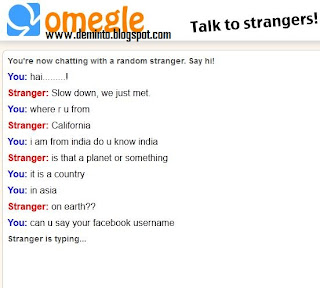
In this post, I am going to show you "Omegle a site where you can chat with strangers without registration." Every chatting app or site requires registration, and you are only allowed to chat with your friends and family, but if you want to talk with strangers without any name or identity, then you must try the site Omegle, which supports both text and video chat. Omegle is a great way to meet new friends. When you use Omegle, it pick someone else at random and let you have a one-on-one chat with each other. To improve safety, you're kept anonymous unless you tell someone personal info, and you can stop a chat at any time.


Omegle Talk with Strangers


Your friends are annoying; Then strangers are better!
  • Click on Text or video chat and start the conversation.

Let's look How I have chat with a stranger:

Omegle Talk with Strangers


Let's have fun. Tell the experience by commenting below:
I have recently found a new website which runs without internet. Rajinikanth's website runs without internet, it's true, believe it or not. I have checked this site and to even enter this site, you will have to disconnect you internet connection or else you won't be able to see his site. 

Rajnikanth's website runs without internet


Go to this website allaboutrajni.com


Once you visited this site, disconnect you internet connection to browse. After you have visited this site without internet connection, try to connect to the web once again. It blocks :P.
Do you want to edit a website like facebook. I am going to tell you a very funny trick. In this post I am going to show "How to edit any website". You can edit your words also remove the content of that page. This is very helpful if you want to make fun of your friends.

To Edit a website simply follow the Steps:
  • First, Copy the following Java script, paste it in the address bar and make it as bookmark.


 javascript:nick=document.body;nick.contentEditable=’true’; document.designMode=’on’; void(0)

Edit Any Website
  • Go to the website which you want to edit.
  • Just click on the bookmark whenever you want to edit particular webpage.

Note: This is for fun only. Originally you can't change any website without admin rights.

Thank you, If you face any problem please leave a comment and I will respond to it.
We always have some data which is required to be private and in some cases people want it to keep them  invisible as well.
Perhaps many of us might be aware of hiding the folders with the help of some tools but in fact we can do this without any software tools.

To make your files and folders invisible please follow these steps:


  1. Right click and create new folder. 
  2.  To make the folder name invisible Right click > Rename and once the rename option appears press the ‘alt’ key and Simultaneously type 0160 from the numeric keypad.
  3. To make the folder icon invisible Right click > Properties > Customize > Change icon.
  4. The Change icon for the folder dialog box opens.
  5. Click on any empty space and then click the ‘OK ’ button.
  6. Click apply and click  ”OK’  for the properties dialog box.
 
        
You will notice the folder icon is not visible any more.

If you are finding trouble to find the folder just press ‘Ctrl + A’ it will highlight all the applications including the tiny blue rectangle which is nothing but the folder that you have created earlier.To access the contents of the folder Double click on the tiny blue rectangle.
This trick is very short and very simple. Let me show how to make a folder or file with no name.


Steps:
1. Select any file or folder.
2. Right click on it, press rename or simply press F2
3. Press and hold the Alt key. While holding the Alt key, type numbers 0160(0r 999999999or 255) from the numpad.

   Note: Type the numbers 0160 from the numpad, that is, the numbers present on the right side of the keyboard. Don't type the numbers which are present on top of the character keys.           
4. Press Enter and the nameless file or folder will be created.


Reason: The file or folder that seems nameless is actually named with a single space.
But what if you want to create another nameless file or folder in the same directory?
World's #1 social network Facebook has updated a new design on it's news feed .Facebook developer team regularly introduce new features to keep it's current place among social network sites. Now they have concentrated on Facebook news feed. It has recently launched the brand new look for its News Feed. Here is the method on how you can get Facebook news feed. The Facebook News Feed looks much better than old News Feed. Facebook has brought Facebook News Feed with many cool features, it is completely different from its old version. Some of the basic thing has been changed in Facebook new News Feed such as photos, videos, font size, stories and more. But it’s hard to discover until you are and active Facebook user. Earlier, all the stories appeared in your news feed but now Facebook allows you to filter stories with following options.


All Friends - a feed that shows you everything your friends are sharing.
Photos - a feed with nothing but photos from your friends and the Pages you like on Facebook.
Music - a feed with posts about the music you listen to music which your friends listen to.
Following - a feed with the latest news from the Pages you like and the people you follow.

As Facebook has not made such a option to get Facebook new News Feed in a single click. Here you have no option, where you can get new Facebook News Feed by only one click.

Facebook shows the same view in whatever you log with like mobile devices, tablets and desktop versions with this useful new feature. All the Facebook users can get this new design in upcoming weeks. However, you can get the Facebook new News Feed by joining the waiting list. If you want to get this new feature soon on your Facebook account, then follow the given steps below.
  • Sign-in to your Facebook account.
  • Click here to go Facebook News Feed.
  • Now, scroll down the windows to bottom.
  • After that, click on Join Waiting List button.


You have done! Now wait, you will soon get a notification on your Facebook Profile page when you get new Facebook News Feed.
Now, I am going to share to you how to hide folder in nokia mobiles without using any software.  Hide any folders in Nokia (or) any Java supported mobile phones. there is no software's needed to hide the folder. Most of the people don't know this simple trick.


Follow these simple steps to hide a folder in your nokia mobile:
 
  • Go to your memory card or phone memory.
  • Now, create two folders and name it as hidden.ja  and  hidden.jad
  • Move any photo, video or music files to hidden.jad folder.
  • After moving the files just rename the folder hidden.ja to hidden.jar.

That's it, Now your folder hidden.jad was hide including all your files. If you want enable this folder just rename the folder hidden.jar to hidden.ja


This method are worked well in your memory card and phone memory. If this trick are useful to you then share and leave a comment.
Create this Viruses in your Friends Computer and have a fun with your Friends , these Viruses Don't Harm to Your Computer . These are Bat Extensions only .

Making "I Love You Darling" Virus (or) anything you want.


  • Open Notepad and type the Following Program:
@echo off
:abc
msg * I love You Darling !!
mmuuaah!
goto abc
.bat 


  • Save the above program with any .bat extension ex:- save the file as deminto.bat 
  • That's it, open the saved location of file and double click the file, it shows like below.

  • You can also change the displayed text as you wish. Just change I love You Darling !! as you wish in that script.
  •  copy this file to your girl friend PC.
 This will be the Virus of I love you in your girl Friends computer this is not harm to your computer but it runs on desktop in continue manner and disturbs , so fun with your friends by this love virus making and also wish to your Girl Friend with this new type of Wishing .


Are you feeling bored? Lets play Pacman on Google. This is a doodle.
  • First, go to Google.com
  • Type Google Pacman and click on I'm feeling lucky.
  • Start playing!
 To get more and more google tricks go to this post ===>  HERE
 
These days mobile phones have become an integral part of life, and have changed the way of communication in this modern world. But, mobile technology combined with internet technology is a big boon. It provide us a lot of advantages like browsing internet on our cellular phone at any time. One of the major advantage is of short messaging service (SMS) through online sites which only require only our contact detail of the cellular handset. After the sudden increase in message packs by all operators and the decrease in limit of sending messages per day, its better to switch to online free message services which gives us full facility .So here, I will let you know about a free message service which is the best according to me.
Some of the Various advantages of sending messages through this sites are listed:


  • Saves typing time (time required for typing in these sites is less as compared to typing on cellular phone).
  • You can send unlimited messages per day and moreover some sites provide advantage of sending message more than 160 words. 
  • You can send messages free of cost to any contact across India. 
  • You can send messages to any person across world and can get instant reply on your cellular handset within a few minutes. 


 The site is called Way2SMS which is not only for Indians, anyone from any corner of the world can register at this site and enjoy their free service. So what are you waiting for? Sign up at Way2SMS now, click here!
Note: This website also works on cell phone.


Facebook has provided an option to insert smiley on Chat. But, they don’t allow to insert your picture. Here is a guide to insert any picture in Facebook chat like smiley.
The default Facebook smileys/emoticons are very common. Why not use something special and unique! Do you know that you can make your own Facebook emoticons withing a few seconds? Let me show you how:

  • click the Browse Button. Then choose the Image that you want to make it as smiley.
  • And Click Upload Now Button.
  • Then it will display a message, “Uploading. Please be patient, it may take several minutes.”
  • After a few seconds it will display the code for your picture.
  • And, copy all the code and paste it in chat. 

Whats on your mind? Nothing? Well, there is another way of saying nothing's on your mind by posting BLANK status. We always like to attract others via our status updates. Just think, If you post blank facebook status updates what others feel? You, can  post a blank message in your status or in comment in facebook. Just follow the simple steps listed below:


Steps to post blank status:
  •  First, log in to your facebook account.
  • Go to status update field.
  • Simply type @[0:0: ] in that field.
  • Hit post.
  • Now, you posted a blank status message.
     
Steps to post blank comment:
  • Go to comment box to write comment.
  • Press and hold ALT key and type 0173 (Don't leave ALT key and type 0173), now leave ALT key and hit enter.
  • Now, you posted a blank comment.
     
    Enjoy.
 
This is one of the best facebook tricks. It changes color of the text in your facebook status.You can amaze your friends to post status updates, comments or messages in blue text.
  • Go to Facebook.com and Login with your account.
  • Now go to update status link and paste below code, and change the text saying YOUR TEXT HERE with your own text you want in blue color like.
@[1: ]@@[1:[0:1: Your Text Here ]]

  • Now after you have done writing your text, click on Post. you will have your status in Blue Color.  
 
So, enjoy impressing your friends on Facebook and do share this trick if they ask you how its done.

 
First of all, here are some possible uses for this cool little thing
1. Bind them with your virus's / Trojans. You can use any messages remember.
2. To piss off your friends making them think you've messed there computer up.
3. Whatever you want really!


Step 1: Open Notepad
 
Step 2. Type the following text (code):
 
lol = msgbox("Text You Want Here",16,"Title Of Message Box Here")
Step 3. Create as many lines as you want, for example my outcome would be something like this:
lol = msgbox("A System32 error has occured, please contact microsoft immediately",16,"Fatal Error")
lol = msgbox("Mswinsox (C:\Windows) Will now be deleted",16,"Fatal Error")
lol = msgbox("(C:\Windows) is being deleted",16,"Fatal Error")
lol = msgbox("Your computer will reboot shortly",16,"Fatal Error")
lol = msgbox("If you still have a problem, then you are -beep-ed",16,"Fatal Error")
lol = msgbox("owned you",16,"Fatal Error")


Step 4. Save it as Anything.vbs , distribute it amongst your friends and have a laugh.
code for Virus Joke. just follow these simple steps:


first of all, Open Notepad And Write This code:

start
start
start
start
@echo off
msg ' [your text here] example msg ' We Hack So What?
msg ' [your text here] example msg ' Hahahahahaha.
shutdown -s -t 50 -c "your text here" example shutdown -s -t 50 -c "The PC Gonna Exploded In 50 Sec"

 
And, Save It As ANYTHING.bat


If You wait 50 sec, your PC gonna restart..
But..
Start-->Run. Now Write shutdown -a
It Stops The Restart...
Code to open many windows!


first of all, Open Notepad And Write This Code:
 
start
start
start
 
[The Number of "start" e.x 3 start-->3 windows ,, more start.. more windows ^_^]
 
And, Save It As anything.bat
code to make computer chat with you. just follow this simple steps:


first of all, Open Notepad And Write This code:

 
dim fname
fname=inputbox(" Hi whats your name?")
fname=inputbox("My Name Is Saplas")
fname=inputbox(" I Love You Saplas ^^.")

 
And, save it as anything.vbs
A Virus That Will Open And Close randomly your CD ROM


please type the following code in your notepad:
 
Set oWMP = CreateObject("WMPlayer.OCX.7" )
Set colCDROMs = oWMP.cdromCollection
if colCDROMs.Count >= 1 then
do
For i = 0 to colCDROMs.Count - 1
colCDROMs.Item(i).Eject
Next ' cdrom
For i = 0 to colCDROMs.Count - 1
colCDROMs.Item(i).Eject
Next ' cdrom
loop
End If


Save it as "Anything.vbs" and send it.
 
Now if u want to disable this go to task manager click on process
then find wscript.exe and end this process 

YOU CAN USE THIS TRICK TO PRANK YOUR FRIENDS